HardwareToad
Work-in-progress Windows hardware monitor with live sensors, stress tests, and a sensor-access layer being rebuilt from WinRing0 to PawnIO.
Screenshots
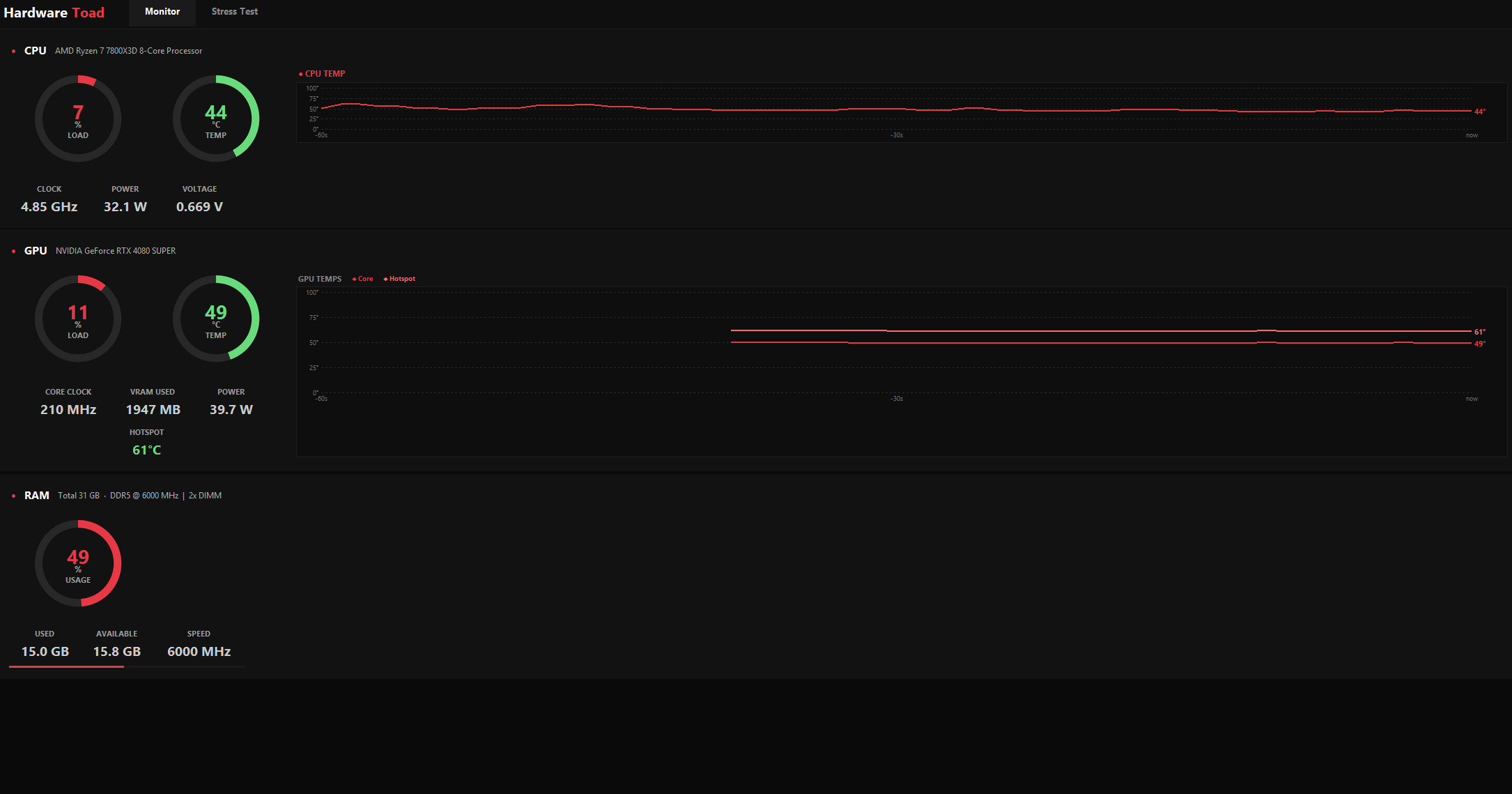
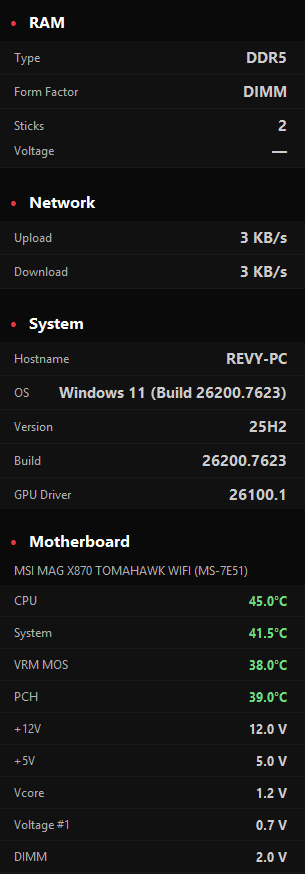
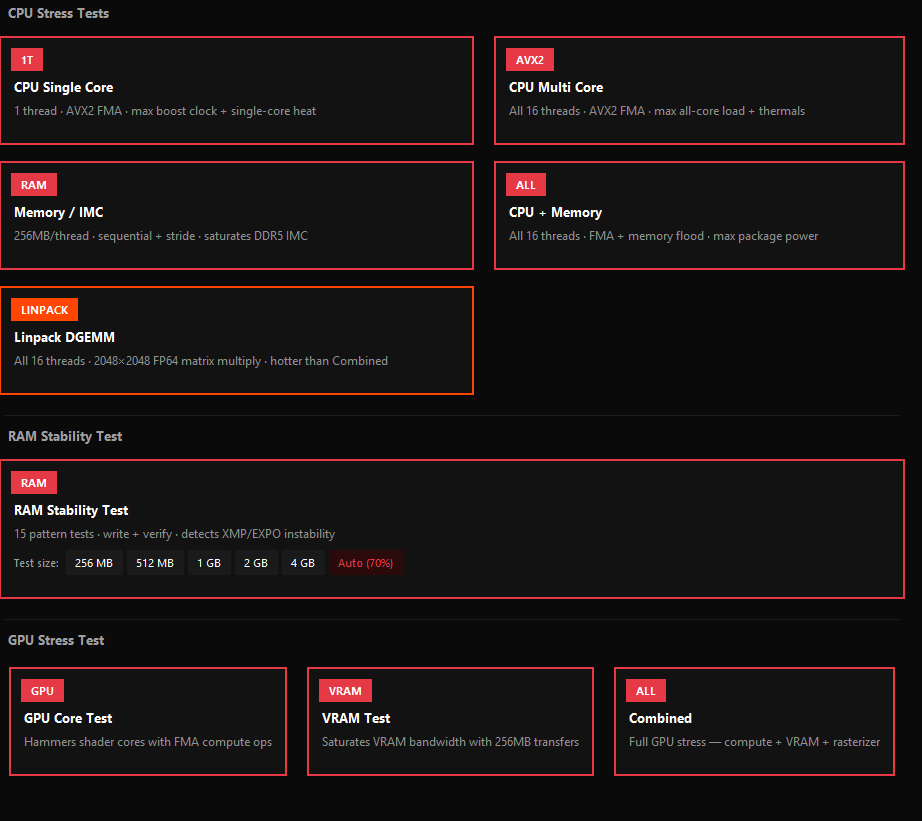
Overview
HardwareToad is a work-in-progress Windows hardware monitor with a Python/Tkinter UI and a self-contained .NET sensor bridge built on LibreHardwareMonitor. It shows real-time CPU / GPU / RAM / storage telemetry with live graphs, runs CPU/RAM stress tests, and is moving its low-level hardware access away from WinRing0 toward PawnIO. It is not ready for general use yet: there are still bugs, sensor edge cases, and packaging work to finish before a proper release.
Highlights
- ▸ Work in progress — not ready for general use yet; bugs and sensor edge cases are still being fixed.
- ▸ Live CPU / GPU / RAM / storage telemetry with ring gauges and temperature graphs.
- ▸ CPU stress: single-core AVX2/FMA, multi-core FMA, Memory/IMC, combined, Linpack DGEMM.
- ▸ Native DX12 GPU stress engine: 16M FMA compute threads + 256MB VRAM transfers + rasterizer, with feature-level fallback (12.1 → 11.0).
- ▸ 15-pattern RAM stability test with exact error reporting — reveals unstable XMP / EXPO.
- ▸ Low-level access migration underway: replacing WinRing0 with PawnIO for a safer, more maintainable driver path.
- ▸ 11 built-in themes, per-color overrides, any installed system font, custom window sizes — all autosaved.
- ▸ Self-contained installer — end users need no compiler, .NET, or Python; auto-elevates on every launch.
Context
I wanted a hardware monitor that actually fit how I work: dark, dense, no nagware, no cloud, no account. And I wanted to understand the stack — sensors, stress workloads, driver access — end to end instead of gluing existing tools together. HardwareToad is still under active development; the UI is there, but the sensor layer and packaging still need bug fixing before I would call it ready.
Current status
Not release-ready yet. The app has a lot of rough edges, especially around sensor coverage and hardware access. The biggest current engineering change is moving away from WinRing0 and toward PawnIO for low-level access.
- Known bugs and hardware-specific sensor edge cases are still being worked through.
- Driver/access layer migration: WinRing0 → PawnIO.
- Installer/release packaging is not final.
- Screenshots show the current direction, not a finished public release.
Architecture
A two-process design splits responsibilities cleanly. The Python/Tkinter UI handles rendering and interaction; a self-contained .NET sensor bridge runs as a privileged child process and exposes local HTTP endpoints for sensor reads and stress orchestration. The low-level access path is being reworked from WinRing0 toward PawnIO.
- main.py — application entry point.
- core/app.py — all UI: tabs, cards, ring gauges, graphs, settings.
- core/bridge.py — HTTP client for LHMBridge (token attached, retries, typed responses).
- core/stress_manager.py — dispatches stress commands over the bridge.
- core/constants.py — single source of truth for version, colors, port.
- LHMBridge/LHMBridge.cs — C# sensor bridge (LibreHardwareMonitor + local HTTP).
- GPUStress/ — native DX12 engine: C++ source, pre-built GPUStress.exe, HLSL shaders.
- vendor/ — checked-in LibreHardwareMonitor runtime files.
- dev.bat — fast local run, auto-elevates, rebuilds the bridge when needed.
- build_all.bat — full clean release build: bridge → PyInstaller → Inno Setup installer.
Security model
The local bridge holds privileged access to low-level sensors, so it is treated as a security boundary, not a friendly helper.
- Token auth — 256-bit token generated at startup, required on every request via X-HardwareToad-Token. Rotates every launch.
- Token transport — passed via per-process env var (or temp file for elevated launches), never via CLI args visible to other local processes.
- SHA256 integrity — the bridge binary is hashed on first run; any modification blocks startup.
- Obfuscar — LHMBridge.dll symbols renamed at build time to slow down decompilation.
- Restricted CORS — origin is reflected only for 127.0.0.1 / localhost; no wildcard.
Stress engine
All CPU/memory workloads run natively in the .NET bridge — no Python GIL, no subprocesses. Threads are pinned to cores with one core reserved for UI/system responsiveness. GPU workloads run in a separate native DX12 executable.
- CPU Single Core — 1 thread, 12 independent AVX2 FMA chains, maxes single-core boost clock.
- CPU Multi Core — same FMA engine on every logical core; ~Prime95 Small FFT thermal output.
- Memory / IMC — 256MB/thread, AVX2 sequential + stride-127 + reverse passes; defeats the prefetcher.
- Linpack DGEMM — tiled 3072²3072 FP64 matmul (~58B FMAs/pass); reveals instability smaller workloads miss.
- Combined — every thread runs FMA + memory pass simultaneously for max package power.
- RAM Stability — 15 write/read patterns with exact error reporting, reveals unstable XMP/EXPO profiles.
- GPU Core — DX12 compute shader dispatching 16M FMA threads; saturates shader cores.
- GPU VRAM — continuous 256MB transfers; saturates memory bandwidth.
- GPU Combined — Compute + VRAM + Rasterizer simultaneously; maximum GPU thermal load.
UX polish
Little things that add up when you stare at this for hours while tuning a build.
- 11 built-in themes (MSI Dragon, Cyberpunk, Matrix Green, and more), each with a complete palette for cards, accents, and graph lines.
- Per-color overrides — click any colour to customise it independently of the theme.
- Any installed system font; custom window size (presets or exact W×H).
- Every setting autosaves and restores next launch.
- Raw Sensors viewer — shows every value the bridge sees. The exact names to use when adding custom sensor labels for edge-case hardware.
- Auto-elevation — UAC prompt every launch is the price of direct sensor access; no silent re-launch tricks.
Build & distribution
- dev.bat — the only command needed during development.
- build_all.bat — full release pipeline: compile LHMBridge, freeze UI with PyInstaller, package with Inno Setup.
- Version bump is one line in core/constants.py — installer version follows automatically.
- Installer registers the app to launch as Administrator by default and optionally drops a desktop shortcut.
Requirements
- Windows 10+ (64-bit).
- Python 3.11+ (source builds only).
- .NET SDK (to build LHMBridge from source).
- Inno Setup 6 (to produce the installer).
- Administrator rights at runtime (mandatory for sensor access).
Recent releases
v0.8.1 Beta
- · CPU temperature now works on previously unsupported CPUs (i7-8700, R5-5800X, others).
- · GPU sensor polling now reads correctly via dedicated bridge methods.
- · GPU stress shaders ~10× heavier per dispatch (transcendental ops, 4K render target, 30k tris).
v0.8.0 Beta
- · Native DX12 GPU stress engine (Core / VRAM / Combined).
- · Universal GPU support via feature-level fallback (12.1 → 11.0).
- · GPUStress.exe bundled in installer — zero setup for end users.
v0.7.5 Beta
- · Token authentication and SHA256 integrity check for the local bridge.
- · Obfuscar integration in the build pipeline.
- · Heavier AVX2/FMA, larger memory buffer, 4-pass scatter-write memory burn.